Apache Iceberg is a high-performance, open-table format designed to manage large-scale analytic datasets with reliability and efficiency. It enables powerful data organization strategies like partitioning and sorting for data lakes and significantly improves query performance. Since query engines like E6data, Spark, Trino, Dremio, and others query these analytical datasets, Apache Iceberg provides multiple options for organizing data to enable these query engines to efficiently query data. One essential feature of Iceberg is its ability to optimize query performance through data organization strategies–Partitioning and sorted columns–enabling efficient querying within partitions.
In this hands-on guide, we’ll explore how sorted data columns within partitions can significantly improve query performance in Apache Iceberg. We will use a real-world dataset—NYC Taxi trip data—to demonstrate how sorting impacts query execution times by improving data skipping and reducing table scans to ultimately result in better query performance and resource utilization. By the end of this blog, you will have understood how to implement sorting within partitions and how it positively impacts query performance.
Prerequisites
For this tutorial, you must have:
Docker and Docker Compose installed on your system
Familiarity with Apache Spark and Spark SQL
The Setup
We'll use Docker Compose to set up the necessary environment, including Spark with Iceberg support and MinIO for object storage. This setup will allow us to experiment with different partitioning and clustering strategies.
Docker Compose Configuration
Let’s use the Docker Compose setup from the Apache Iceberg Quickstart Guide. Save the following content as docker-compose.yml:
version: "3"
services:
spark-iceberg:
image: tabulario/spark-iceberg:3.5.1_1.5.0
container_name: spark-iceberg
build: spark/
networks:
iceberg_net:
depends_on:
- rest
- minio
volumes:
- ./warehouse:/home/iceberg/warehouse
- ./notebooks:/home/iceberg/notebooks/notebooks
environment:
- AWS_ACCESS_KEY_ID=admin
- AWS_SECRET_ACCESS_KEY=password
- AWS_REGION=us-east-1
- SPARK_SQL_EXECUTION_ARROW_PYSPARK_ENABLED=true
ports:
- 8888:8888
- 8080:8080
- 10000:10000
- 10001:10001
- 4041:4041
rest:
image: tabulario/iceberg-rest
container_name: iceberg-rest
networks:
iceberg_net:
ports:
- 8181:8181
environment:
- AWS_ACCESS_KEY_ID=admin
- AWS_SECRET_ACCESS_KEY=password
- AWS_REGION=us-east-1
- CATALOG_WAREHOUSE=s3:
- CATALOG_IO__IMPL=org.apache.iceberg.aws.s3.S3FileIO
- CATALOG_S3_ENDPOINT=http:
minio:
image: minio/minio
container_name: minio
volumes:
- ./minio/data:/data
environment:
- MINIO_ROOT_USER=admin
- MINIO_ROOT_PASSWORD=password
- MINIO_DOMAIN=minio
networks:
iceberg_net:
aliases:
- warehouse.minio
ports:
- 9001:9001
- 9000:9000
command: ["server", "/data", "--console-address", ":9001"]
mc:
depends_on:
- minio
image: minio/mc
container_name: mc
networks:
iceberg_net:
environment:
- AWS_ACCESS_KEY_ID=admin
- AWS_SECRET_ACCESS_KEY=password
- AWS_REGION=us-east-1
entrypoint: >
/bin/sh -c "
until (/usr/bin/mc config host add minio http:
/usr/bin/mc rm -r --force minio/warehouse;
/usr/bin/mc mb minio/warehouse;
/usr/bin/mc policy set public minio/warehouse;
tail -f /dev/null
"
networks:
iceberg_net:version: "3"
services:
spark-iceberg:
image: tabulario/spark-iceberg:3.5.1_1.5.0
container_name: spark-iceberg
build: spark/
networks:
iceberg_net:
depends_on:
- rest
- minio
volumes:
- ./warehouse:/home/iceberg/warehouse
- ./notebooks:/home/iceberg/notebooks/notebooks
environment:
- AWS_ACCESS_KEY_ID=admin
- AWS_SECRET_ACCESS_KEY=password
- AWS_REGION=us-east-1
- SPARK_SQL_EXECUTION_ARROW_PYSPARK_ENABLED=true
ports:
- 8888:8888
- 8080:8080
- 10000:10000
- 10001:10001
- 4041:4041
rest:
image: tabulario/iceberg-rest
container_name: iceberg-rest
networks:
iceberg_net:
ports:
- 8181:8181
environment:
- AWS_ACCESS_KEY_ID=admin
- AWS_SECRET_ACCESS_KEY=password
- AWS_REGION=us-east-1
- CATALOG_WAREHOUSE=s3:
- CATALOG_IO__IMPL=org.apache.iceberg.aws.s3.S3FileIO
- CATALOG_S3_ENDPOINT=http:
minio:
image: minio/minio
container_name: minio
volumes:
- ./minio/data:/data
environment:
- MINIO_ROOT_USER=admin
- MINIO_ROOT_PASSWORD=password
- MINIO_DOMAIN=minio
networks:
iceberg_net:
aliases:
- warehouse.minio
ports:
- 9001:9001
- 9000:9000
command: ["server", "/data", "--console-address", ":9001"]
mc:
depends_on:
- minio
image: minio/mc
container_name: mc
networks:
iceberg_net:
environment:
- AWS_ACCESS_KEY_ID=admin
- AWS_SECRET_ACCESS_KEY=password
- AWS_REGION=us-east-1
entrypoint: >
/bin/sh -c "
until (/usr/bin/mc config host add minio http:
/usr/bin/mc rm -r --force minio/warehouse;
/usr/bin/mc mb minio/warehouse;
/usr/bin/mc policy set public minio/warehouse;
tail -f /dev/null
"
networks:
iceberg_net:version: "3"
services:
spark-iceberg:
image: tabulario/spark-iceberg:3.5.1_1.5.0
container_name: spark-iceberg
build: spark/
networks:
iceberg_net:
depends_on:
- rest
- minio
volumes:
- ./warehouse:/home/iceberg/warehouse
- ./notebooks:/home/iceberg/notebooks/notebooks
environment:
- AWS_ACCESS_KEY_ID=admin
- AWS_SECRET_ACCESS_KEY=password
- AWS_REGION=us-east-1
- SPARK_SQL_EXECUTION_ARROW_PYSPARK_ENABLED=true
ports:
- 8888:8888
- 8080:8080
- 10000:10000
- 10001:10001
- 4041:4041
rest:
image: tabulario/iceberg-rest
container_name: iceberg-rest
networks:
iceberg_net:
ports:
- 8181:8181
environment:
- AWS_ACCESS_KEY_ID=admin
- AWS_SECRET_ACCESS_KEY=password
- AWS_REGION=us-east-1
- CATALOG_WAREHOUSE=s3:
- CATALOG_IO__IMPL=org.apache.iceberg.aws.s3.S3FileIO
- CATALOG_S3_ENDPOINT=http:
minio:
image: minio/minio
container_name: minio
volumes:
- ./minio/data:/data
environment:
- MINIO_ROOT_USER=admin
- MINIO_ROOT_PASSWORD=password
- MINIO_DOMAIN=minio
networks:
iceberg_net:
aliases:
- warehouse.minio
ports:
- 9001:9001
- 9000:9000
command: ["server", "/data", "--console-address", ":9001"]
mc:
depends_on:
- minio
image: minio/mc
container_name: mc
networks:
iceberg_net:
environment:
- AWS_ACCESS_KEY_ID=admin
- AWS_SECRET_ACCESS_KEY=password
- AWS_REGION=us-east-1
entrypoint: >
/bin/sh -c "
until (/usr/bin/mc config host add minio http:
/usr/bin/mc rm -r --force minio/warehouse;
/usr/bin/mc mb minio/warehouse;
/usr/bin/mc policy set public minio/warehouse;
tail -f /dev/null
"
networks:
iceberg_net:version: "3"
services:
spark-iceberg:
image: tabulario/spark-iceberg:3.5.1_1.5.0
container_name: spark-iceberg
build: spark/
networks:
iceberg_net:
depends_on:
- rest
- minio
volumes:
- ./warehouse:/home/iceberg/warehouse
- ./notebooks:/home/iceberg/notebooks/notebooks
environment:
- AWS_ACCESS_KEY_ID=admin
- AWS_SECRET_ACCESS_KEY=password
- AWS_REGION=us-east-1
- SPARK_SQL_EXECUTION_ARROW_PYSPARK_ENABLED=true
ports:
- 8888:8888
- 8080:8080
- 10000:10000
- 10001:10001
- 4041:4041
rest:
image: tabulario/iceberg-rest
container_name: iceberg-rest
networks:
iceberg_net:
ports:
- 8181:8181
environment:
- AWS_ACCESS_KEY_ID=admin
- AWS_SECRET_ACCESS_KEY=password
- AWS_REGION=us-east-1
- CATALOG_WAREHOUSE=s3:
- CATALOG_IO__IMPL=org.apache.iceberg.aws.s3.S3FileIO
- CATALOG_S3_ENDPOINT=http:
minio:
image: minio/minio
container_name: minio
volumes:
- ./minio/data:/data
environment:
- MINIO_ROOT_USER=admin
- MINIO_ROOT_PASSWORD=password
- MINIO_DOMAIN=minio
networks:
iceberg_net:
aliases:
- warehouse.minio
ports:
- 9001:9001
- 9000:9000
command: ["server", "/data", "--console-address", ":9001"]
mc:
depends_on:
- minio
image: minio/mc
container_name: mc
networks:
iceberg_net:
environment:
- AWS_ACCESS_KEY_ID=admin
- AWS_SECRET_ACCESS_KEY=password
- AWS_REGION=us-east-1
entrypoint: >
/bin/sh -c "
until (/usr/bin/mc config host add minio http:
/usr/bin/mc rm -r --force minio/warehouse;
/usr/bin/mc mb minio/warehouse;
/usr/bin/mc policy set public minio/warehouse;
tail -f /dev/null
"
networks:
iceberg_net:
Starting the environment
Run the following command to commence the Docker services:
The Dataset
We'll now use the NYC Yellow Taxi trip data for January and February 2022.You will find these files under /home/iceberg/data/
root@31d643fb14db:/opt/spark# ls /home/iceberg/data/
nyc_film_permits.json
yellow_tripdata_2021-04.parquet
yellow_tripdata_2021-05.parquet
yellow_tripdata_2021-06.parquet
yellow_tripdata_2021-07.parquet
yellow_tripdata_2021-08.parquet
yellow_tripdata_2021-09.parquet
yellow_tripdata_2021-10.parquet
yellow_tripdata_2021-11.parquet
yellow_tripdata_2021-12.parquet
yellow_tripdata_2022-01.parquet
yellow_tripdata_2022-02.parquet
yellow_tripdata_2022-03.parquet
yellow_tripdata_2022-04.parquet
root@31d643fb14db:/opt/spark# ls /home/iceberg/data/
nyc_film_permits.json
yellow_tripdata_2021-04.parquet
yellow_tripdata_2021-05.parquet
yellow_tripdata_2021-06.parquet
yellow_tripdata_2021-07.parquet
yellow_tripdata_2021-08.parquet
yellow_tripdata_2021-09.parquet
yellow_tripdata_2021-10.parquet
yellow_tripdata_2021-11.parquet
yellow_tripdata_2021-12.parquet
yellow_tripdata_2022-01.parquet
yellow_tripdata_2022-02.parquet
yellow_tripdata_2022-03.parquet
yellow_tripdata_2022-04.parquet
root@31d643fb14db:/opt/spark# ls /home/iceberg/data/
nyc_film_permits.json
yellow_tripdata_2021-04.parquet
yellow_tripdata_2021-05.parquet
yellow_tripdata_2021-06.parquet
yellow_tripdata_2021-07.parquet
yellow_tripdata_2021-08.parquet
yellow_tripdata_2021-09.parquet
yellow_tripdata_2021-10.parquet
yellow_tripdata_2021-11.parquet
yellow_tripdata_2021-12.parquet
yellow_tripdata_2022-01.parquet
yellow_tripdata_2022-02.parquet
yellow_tripdata_2022-03.parquet
yellow_tripdata_2022-04.parquet
root@31d643fb14db:/opt/spark# ls /home/iceberg/data/
nyc_film_permits.json
yellow_tripdata_2021-04.parquet
yellow_tripdata_2021-05.parquet
yellow_tripdata_2021-06.parquet
yellow_tripdata_2021-07.parquet
yellow_tripdata_2021-08.parquet
yellow_tripdata_2021-09.parquet
yellow_tripdata_2021-10.parquet
yellow_tripdata_2021-11.parquet
yellow_tripdata_2021-12.parquet
yellow_tripdata_2022-01.parquet
yellow_tripdata_2022-02.parquet
yellow_tripdata_2022-03.parquet
yellow_tripdata_2022-04.parquet
If you aren’t able to see this, download and place the datasets in the data directory:
mkdir data
cd data
wget https:
wget https:
mkdir data
cd data
wget https:
wget https:
mkdir data
cd data
wget https:
wget https:
mkdir data
cd data
wget https:
wget https:
Loading Data into Temporary Views
We’ll create temporary views in Spark SQL to load data from the Parquet files. Temporary views are necessary for loading the parquet and setting it up to create an iceberg table later using the same data inside S3-compatible Minio Object storage. Next, connect to the Spark shell inside the Docker container:
docker exec -it spark /home/iceberg/bin/spark-sql
docker exec -it spark /home/iceberg/bin/spark-sql
docker exec -it spark /home/iceberg/bin/spark-sql
docker exec -it spark /home/iceberg/bin/spark-sql
Create temporary views for the Parquet files:
-- For January data
CREATE OR REPLACE TEMPORARY VIEW parquet_temp_view
USING parquet
OPTIONS (
  path '/home/iceberg/data/yellow_tripdata_2022-01.parquet'
);

-- For February data
CREATE OR REPLACE TEMPORARY VIEW parquet_temp_view2
USING parquet
OPTIONS (
  path '/home/iceberg/data/yellow_tripdata_2022-02.parquet'
);
-- For January data
CREATE OR REPLACE TEMPORARY VIEW parquet_temp_view
USING parquet
OPTIONS (
  path '/home/iceberg/data/yellow_tripdata_2022-01.parquet'
);

-- For February data
CREATE OR REPLACE TEMPORARY VIEW parquet_temp_view2
USING parquet
OPTIONS (
  path '/home/iceberg/data/yellow_tripdata_2022-02.parquet'
);
-- For January data
CREATE OR REPLACE TEMPORARY VIEW parquet_temp_view
USING parquet
OPTIONS (
  path '/home/iceberg/data/yellow_tripdata_2022-01.parquet'
);

-- For February data
CREATE OR REPLACE TEMPORARY VIEW parquet_temp_view2
USING parquet
OPTIONS (
  path '/home/iceberg/data/yellow_tripdata_2022-02.parquet'
);
-- For January data
CREATE OR REPLACE TEMPORARY VIEW parquet_temp_view
USING parquet
OPTIONS (
  path '/home/iceberg/data/yellow_tripdata_2022-01.parquet'
);

-- For February data
CREATE OR REPLACE TEMPORARY VIEW parquet_temp_view2
USING parquet
OPTIONS (
  path '/home/iceberg/data/yellow_tripdata_2022-02.parquet'
);
Creating and Populating a Partitioned Table
Creating the Partitioned Table
To demonstrate the benefit of sorting within partitions, we’ll create a partitioned table without sorted columns. This will serve as our baseline for comparing query performance
CREATE TABLE demo.nyc.taxis_partitioned (
    VendorID BIGINT,
    tpep_pickup_datetime TIMESTAMP,
    tpep_dropoff_datetime TIMESTAMP,
    passenger_count DOUBLE,
    trip_distance DOUBLE,
    RatecodeID DOUBLE,
    store_and_fwd_flag STRING,
    PULocationID BIGINT,
    DOLocationID BIGINT,
    payment_type BIGINT,
    fare_amount DOUBLE,
    extra DOUBLE,
    mta_tax DOUBLE,
    tip_amount DOUBLE,
    tolls_amount DOUBLE,
    improvement_surcharge DOUBLE,
    total_amount DOUBLE,
    congestion_surcharge DOUBLE,
    airport_fee DOUBLE
)
USING ICEBERG
PARTITIONED BY (
    payment_type
);
CREATE TABLE demo.nyc.taxis_partitioned (
VendorID BIGINT,
tpep_pickup_datetime TIMESTAMP,
tpep_dropoff_datetime TIMESTAMP,
passenger_count DOUBLE,
trip_distance DOUBLE,
RatecodeID DOUBLE,
store_and_fwd_flag STRING,
PULocationID BIGINT,
DOLocationID BIGINT,
payment_type BIGINT,
fare_amount DOUBLE,
extra DOUBLE,
mta_tax DOUBLE,
tip_amount DOUBLE,
tolls_amount DOUBLE,
improvement_surcharge DOUBLE,
total_amount DOUBLE,
congestion_surcharge DOUBLE,
airport_fee DOUBLE
)
USING ICEBERG
PARTITIONED BY (
payment_type
);CREATE TABLE demo.nyc.taxis_partitioned (
VendorID BIGINT,
tpep_pickup_datetime TIMESTAMP,
tpep_dropoff_datetime TIMESTAMP,
passenger_count DOUBLE,
trip_distance DOUBLE,
RatecodeID DOUBLE,
store_and_fwd_flag STRING,
PULocationID BIGINT,
DOLocationID BIGINT,
payment_type BIGINT,
fare_amount DOUBLE,
extra DOUBLE,
mta_tax DOUBLE,
tip_amount DOUBLE,
tolls_amount DOUBLE,
improvement_surcharge DOUBLE,
total_amount DOUBLE,
congestion_surcharge DOUBLE,
airport_fee DOUBLE
)
USING ICEBERG
PARTITIONED BY (
payment_type
);CREATE TABLE demo.nyc.taxis_partitioned (
VendorID BIGINT,
tpep_pickup_datetime TIMESTAMP,
tpep_dropoff_datetime TIMESTAMP,
passenger_count DOUBLE,
trip_distance DOUBLE,
RatecodeID DOUBLE,
store_and_fwd_flag STRING,
PULocationID BIGINT,
DOLocationID BIGINT,
payment_type BIGINT,
fare_amount DOUBLE,
extra DOUBLE,
mta_tax DOUBLE,
tip_amount DOUBLE,
tolls_amount DOUBLE,
improvement_surcharge DOUBLE,
total_amount DOUBLE,
congestion_surcharge DOUBLE,
airport_fee DOUBLE
)
USING ICEBERG
PARTITIONED BY (
payment_type
);
Inserting Data into the Partitioned Table
Insert data from the temporary views:
INSERT INTO demo.nyc.taxis_partitioned SELECT * FROM parquet_temp_view;
INSERT INTO demo.nyc.taxis_partitioned SELECT * FROM parquet_temp_view;
INSERT INTO demo.nyc.taxis_partitioned SELECT * FROM parquet_temp_view;
INSERT INTO demo.nyc.taxis_partitioned SELECT * FROM parquet_temp_view;
INSERT INTO demo.nyc.taxis_partitioned SELECT * FROM parquet_temp_view2;
INSERT INTO demo.nyc.taxis_partitioned SELECT * FROM parquet_temp_view2;
INSERT INTO demo.nyc.taxis_partitioned SELECT * FROM parquet_temp_view2;
INSERT INTO demo.nyc.taxis_partitioned SELECT * FROM parquet_temp_view2;
Creating and Populating a Partitioned and Sorted Table
Now, with the same data, let’s create another Iceberg table with sorted columns. This approach combines partitioning and clustering to optimize storage and query performance.
Creating the Partitioned and Sorted Table
CREATE TABLE demo.nyc.taxis_partitioned_sorted (
    VendorID BIGINT,
    tpep_pickup_datetime TIMESTAMP,
    tpep_dropoff_datetime TIMESTAMP,
    passenger_count DOUBLE,
    trip_distance DOUBLE,
    RatecodeID DOUBLE,
    store_and_fwd_flag STRING,
    PULocationID BIGINT,
    DOLocationID BIGINT,
    payment_type BIGINT,
    fare_amount DOUBLE,
    extra DOUBLE,
    mta_tax DOUBLE,
    tip_amount DOUBLE,
    tolls_amount DOUBLE,
    improvement_surcharge DOUBLE,
    total_amount DOUBLE,
    congestion_surcharge DOUBLE,
    airport_fee DOUBLE
)
USING ICEBERG
PARTITIONED BY (
    payment_type
);
CREATE TABLE demo.nyc.taxis_partitioned_sorted (
VendorID BIGINT,
tpep_pickup_datetime TIMESTAMP,
tpep_dropoff_datetime TIMESTAMP,
passenger_count DOUBLE,
trip_distance DOUBLE,
RatecodeID DOUBLE,
store_and_fwd_flag STRING,
PULocationID BIGINT,
DOLocationID BIGINT,
payment_type BIGINT,
fare_amount DOUBLE,
extra DOUBLE,
mta_tax DOUBLE,
tip_amount DOUBLE,
tolls_amount DOUBLE,
improvement_surcharge DOUBLE,
total_amount DOUBLE,
congestion_surcharge DOUBLE,
airport_fee DOUBLE
)
USING ICEBERG
PARTITIONED BY (
payment_type
);CREATE TABLE demo.nyc.taxis_partitioned_sorted (
VendorID BIGINT,
tpep_pickup_datetime TIMESTAMP,
tpep_dropoff_datetime TIMESTAMP,
passenger_count DOUBLE,
trip_distance DOUBLE,
RatecodeID DOUBLE,
store_and_fwd_flag STRING,
PULocationID BIGINT,
DOLocationID BIGINT,
payment_type BIGINT,
fare_amount DOUBLE,
extra DOUBLE,
mta_tax DOUBLE,
tip_amount DOUBLE,
tolls_amount DOUBLE,
improvement_surcharge DOUBLE,
total_amount DOUBLE,
congestion_surcharge DOUBLE,
airport_fee DOUBLE
)
USING ICEBERG
PARTITIONED BY (
payment_type
);CREATE TABLE demo.nyc.taxis_partitioned_sorted (
VendorID BIGINT,
tpep_pickup_datetime TIMESTAMP,
tpep_dropoff_datetime TIMESTAMP,
passenger_count DOUBLE,
trip_distance DOUBLE,
RatecodeID DOUBLE,
store_and_fwd_flag STRING,
PULocationID BIGINT,
DOLocationID BIGINT,
payment_type BIGINT,
fare_amount DOUBLE,
extra DOUBLE,
mta_tax DOUBLE,
tip_amount DOUBLE,
tolls_amount DOUBLE,
improvement_surcharge DOUBLE,
total_amount DOUBLE,
congestion_surcharge DOUBLE,
airport_fee DOUBLE
)
USING ICEBERG
PARTITIONED BY (
payment_type
);
Setting the Sort Order
We’ll alter the table to set the sort order on fare_amount. The syntax for setting the sort order involves using the ALTER TABLE statement and WRITE ORDERED BY. This command ensures that the specified column organizes data within each partition, which improves data skipping and query efficiency.
Setting the Sort Order
We’ll alter the table to set the sort order on fare_amount. The syntax for setting the sort order involves using the ALTER TABLE statement and WRITE ORDERED BY. This command ensures that the specified column organizes data within each partition, which improves data skipping and query efficiency
Setting the Sort Order
We’ll alter the table to set the sort order on fare_amount. The syntax for setting the sort order involves using the ALTER TABLE statement and WRITE ORDERED BY. This command ensures that the specified column organizes data within each partition, which improves data skipping and query efficiency
Setting the Sort Order
We’ll alter the table to set the sort order on fare_amount. The syntax for setting the sort order involves using the ALTER TABLE statement and WRITE ORDERED BY. This command ensures that the specified column organizes data within each partition, which improves data skipping and query efficiency
Setting the Sort Order
We’ll alter the table to set the sort order on fare_amount. The syntax for setting the sort order involves using the ALTER TABLE statement and WRITE ORDERED BY. This command ensures that the specified column organizes data within each partition, which improves data skipping and query efficiency
Inserting Data into the Sorted Table
Although inserting data into the sorted table takes longer due to the sorting overhead, it results in more efficient data organization and can significantly reduce storage costs in the long run.
INSERT INTO demo.nyc.taxis_partitioned_sorted
SELECT * FROM parquet_temp_view;
INSERT INTO demo.nyc.taxis_partitioned_sorted
SELECT * FROM parquet_temp_view;
INSERT INTO demo.nyc.taxis_partitioned_sorted
SELECT * FROM parquet_temp_view;
INSERT INTO demo.nyc.taxis_partitioned_sorted
SELECT * FROM parquet_temp_view;
INSERT INTO demo.nyc.taxis_partitioned_sorted
SELECT * FROM parquet_temp_view2;
INSERT INTO demo.nyc.taxis_partitioned_sorted
SELECT * FROM parquet_temp_view2;
INSERT INTO demo.nyc.taxis_partitioned_sorted
SELECT * FROM parquet_temp_view2;
INSERT INTO demo.nyc.taxis_partitioned_sorted
SELECT * FROM parquet_temp_view2;
Running Queries: Comparing Sorted vs Unsorted Columns
Query 1
Let’s run the following queries in the sorted and unsorted columns to see how they impact performance. We’ll examine the Spark planner from the UI after running each query to identify key differences in efficiency compared to running the queries on unsorted columns. This will help us understand how different query patterns benefit from our partitioning strategy and clustering approach.Instruction to see planner
Start your spark sql server by running spark-sql in spark-iceberg container
Go to localhost:4041
Run your query in spark-sql
Go to SQL/DataFrame
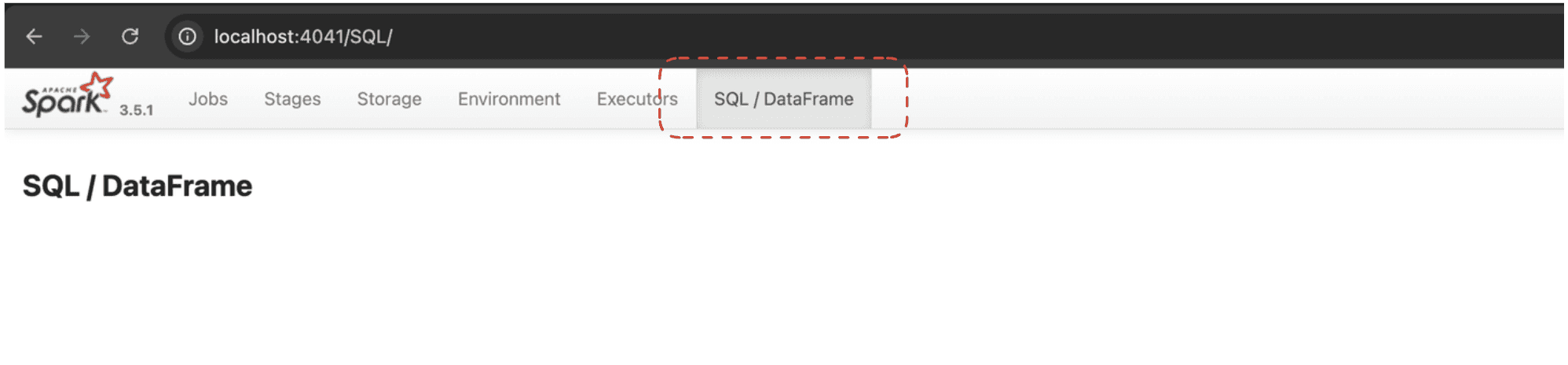
Click on the query you want to view the details of
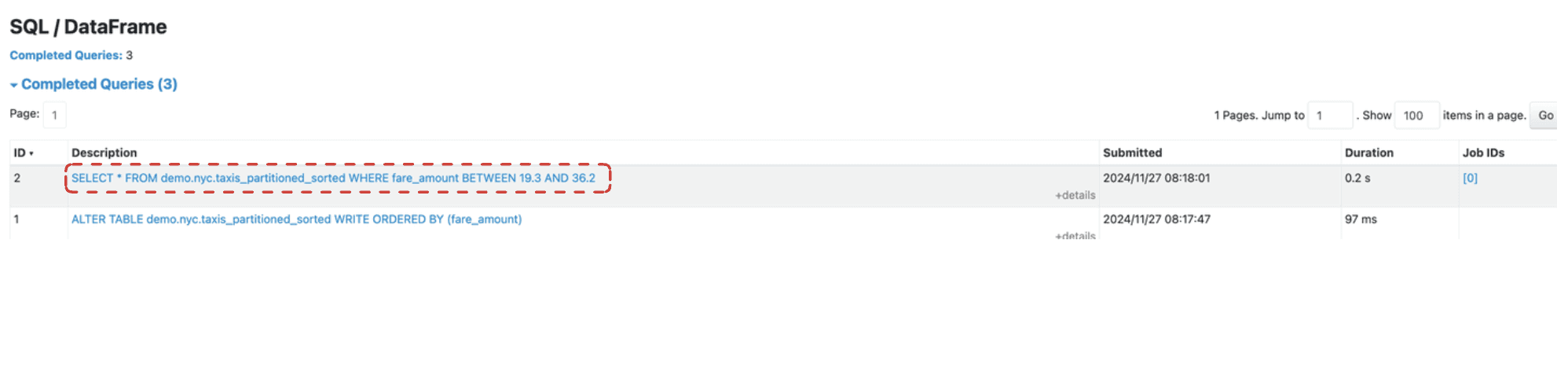
Query 1: Without Sorting:
SELECT * FROM demo.nyc.taxis_partitioned WHERE fare_amount BETWEEN 19.3 AND 36.2;
SELECT * FROM demo.nyc.taxis_partitioned WHERE fare_amount BETWEEN 19.3 AND 36.2;
SELECT * FROM demo.nyc.taxis_partitioned WHERE fare_amount BETWEEN 19.3 AND 36.2;
SELECT * FROM demo.nyc.taxis_partitioned WHERE fare_amount BETWEEN 19.3 AND 36.2;
Query 1: With Sorting:
SELECT * FROM demo.nyc.taxis_partitioned_sorted WHERE fare_amount BETWEEN 19.3 AND 36.2;
SELECT * FROM demo.nyc.taxis_partitioned_sorted WHERE fare_amount BETWEEN 19.3 AND 36.2;
SELECT * FROM demo.nyc.taxis_partitioned_sorted WHERE fare_amount BETWEEN 19.3 AND 36.2;
SELECT * FROM demo.nyc.taxis_partitioned_sorted WHERE fare_amount BETWEEN 19.3 AND 36.2;

Observations:
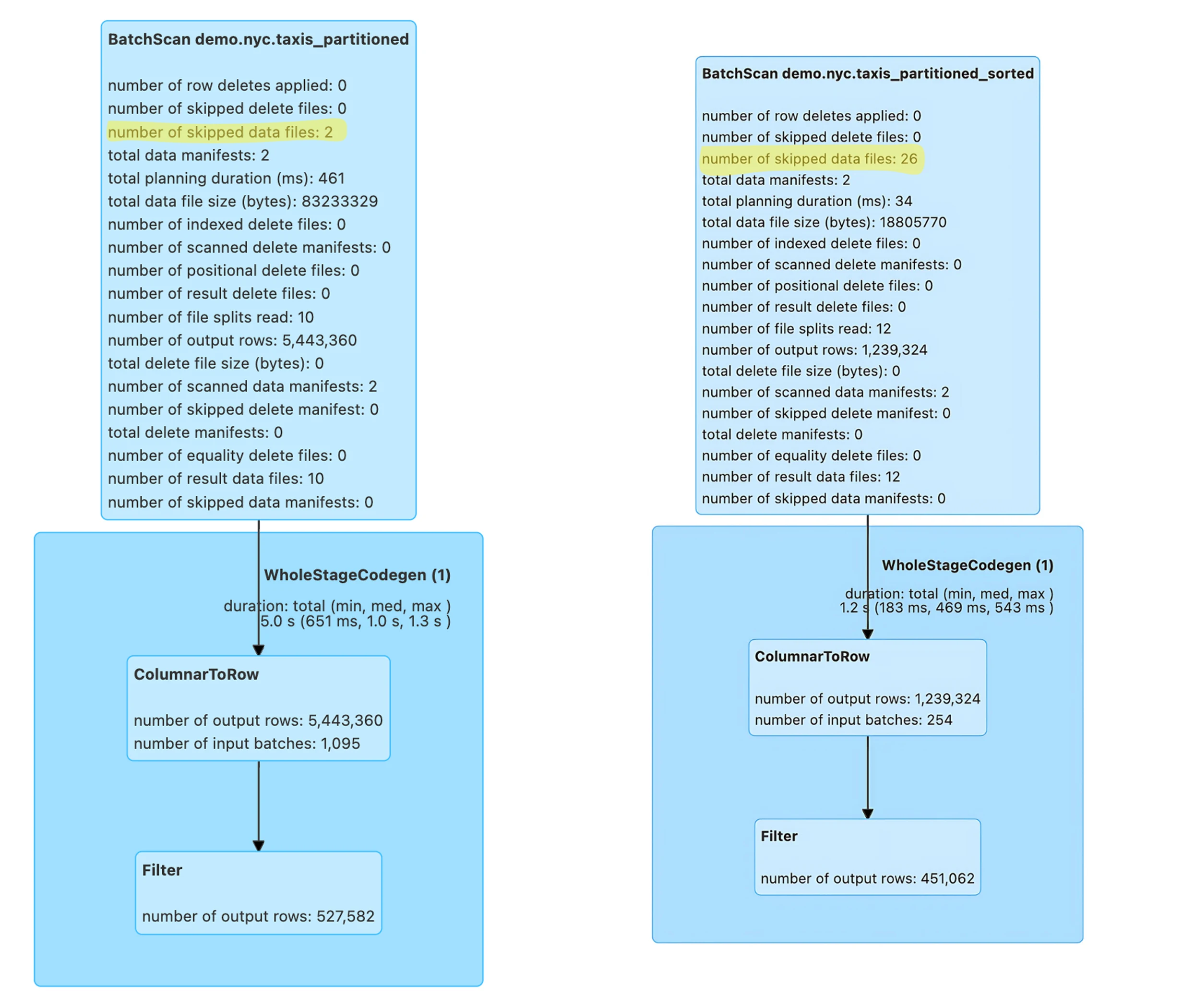
The query on the partitioned-only table took 5.0s and processed 5,443,360 rows, with only 2 skipped data files. This indicates limited data pruning, resulting in longer execution times.
The partitioned with sorted column table query took 2.1s and processed 1,239,324 rows, with 26 skipped data files. Sorting significantly improved data skipping, reducing the rows processed and resulting in faster execution time. This demonstrates how proper clustering can optimize performance for specific query workloads.
Query 2
Let’s run another set of queries on the sorted and unsorted tables to evaluate performance differences for a different filter condition. This will help us understand how our partitioning and clustering strategy performs across various query patterns.
Query 2: Without Sorting:
SELECT * FROM demo.nyc.taxis_partitioned WHERE fare_amount >= 650;
SELECT * FROM demo.nyc.taxis_partitioned WHERE fare_amount >= 650;
SELECT * FROM demo.nyc.taxis_partitioned WHERE fare_amount >= 650;
SELECT * FROM demo.nyc.taxis_partitioned WHERE fare_amount >= 650;
Query 2: With Sorting:
SELECT * FROM demo.nyc.taxis_partitioned_sorted WHERE fare_amount >= 650;
SELECT * FROM demo.nyc.taxis_partitioned_sorted WHERE fare_amount >= 650;
SELECT * FROM demo.nyc.taxis_partitioned_sorted WHERE fare_amount >= 650;
SELECT * FROM demo.nyc.taxis_partitioned_sorted WHERE fare_amount >= 650;

Observations:
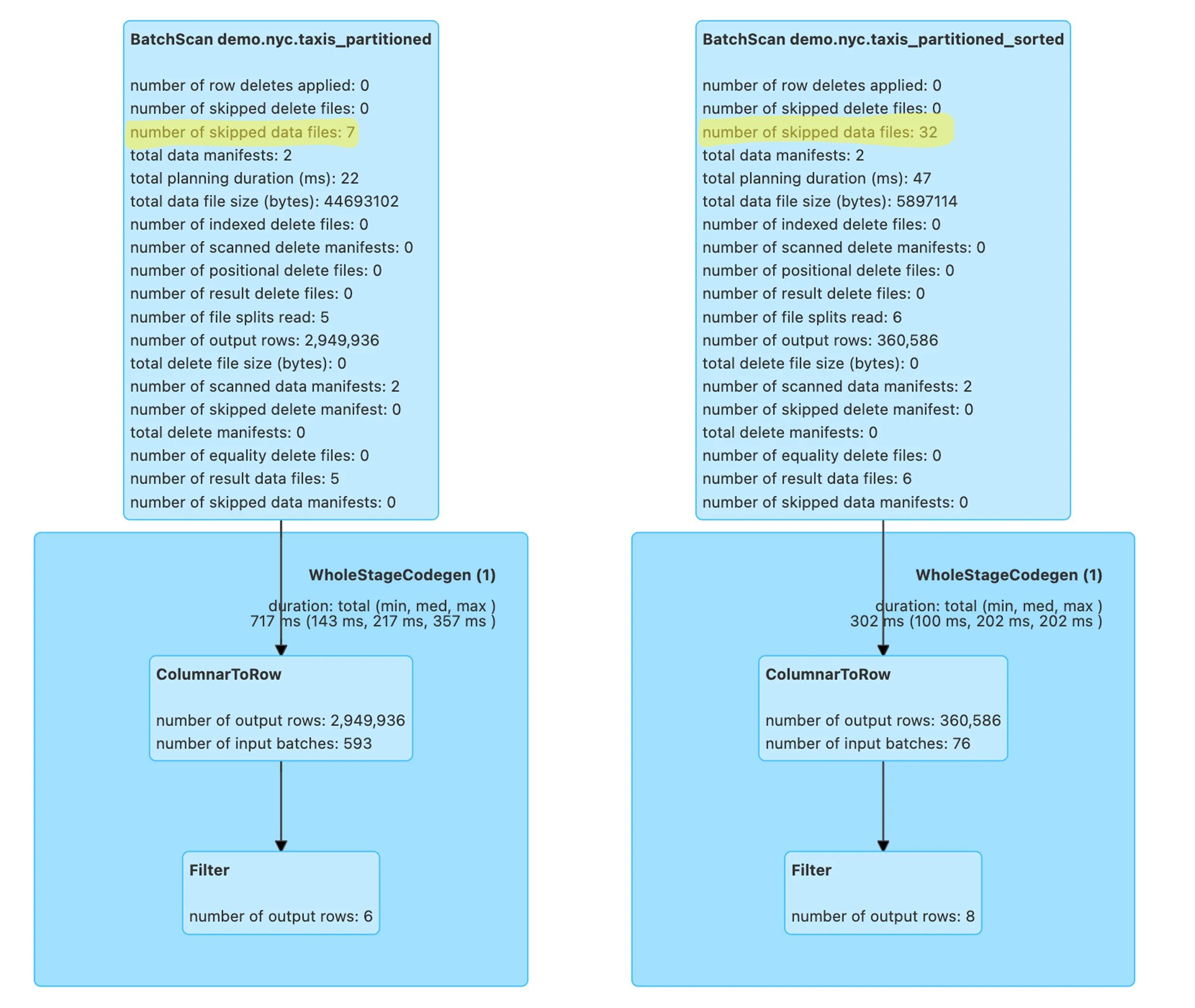
The query on the partitioned-only table took 717ms and processed 2,949,936 rows, with 7 skipped data files. Limited data skipping led to more rows being processed.
The query on the partitioned and sorted table took 302ms and processed 360,586 rows, with 32 skipped data files. Sorting significantly improved data skipping, reducing the rows processed and resulting in faster execution time.
Conclusion
By sorting data within partitions on the fare_amount in the column, we’ve demonstrated that query performance can be significantly improved in Apache Iceberg. Since the data is sorted across multiple Parquet files inside a partition, it allows for better pruning and makes queries more efficient. Sorting allows the query engine to utilize min/max statistics stored in the Parquet file footers to prune unnecessary data files, reducing the amount of data scanned and speeding up query execution.
This approach to data organization, combining partitioning and clustering (sorting), is particularly effective in a data lakehouse architecture. It leverages Apache Iceberg’s advanced features like hidden partitioning and partition evolution to provide flexibility and performance benefits.
Key Insights
Sorting Within Partitions: Enhances data skipping beyond what partitioning alone can achieve, effectively combining the benefits of partitioning and clustering.
Efficient Data Pruning: The query engine reads only relevant data files, minimizing I/O operations and reducing storage costs.
Improved Query Performance: Queries execute faster due to reduced data scanning.
Resource Utilization: Lower CPU and memory consumption during query execution, leading to more efficient use of compute resources.
Metadata Management: Apache Iceberg’s efficient handling of metadata, including manifest files, contributes to better overall performance.
Dynamic Partitioning: Iceberg supports dynamic partitioning, allowing for more flexible and efficient data organization as your data grows.
Write Isolation: Apache Iceberg provides write isolation, ensuring data consistency during concurrent write operations.
By effectively combining partitioning with intra-partition sorting and leveraging Apache Iceberg’s advanced features like Z-ordering and partition transforms, you can optimize your Apache Iceberg tables for superior performance and make your data analytics faster and more efficient. This approach not only improves query performance but also helps in reducing storage costs and maintenance efforts in the long run.
Remember to regularly analyze your query workload and adjust your partitioning strategy and clustering approach accordingly. You may also want to consider implementing file compaction and snapshot expiration to manage data size and remove orphaned files, further optimizing your Apache Iceberg implementation.